Workday ASOR: Why You Should Set Up Agent System of Record Now
ASOR is free, requires no extra SKU, and gives you control over which AI agents run in your tenant. Most customers haven't configured it yet. Here's why you should.
Workday shipped Agent System of Record (ASOR) as the central hub for managing every AI agent in your tenant. It's free, requires no additional SKU, and is available in all environments. Most Workday customers haven't configured it yet because it arrived alongside a wave of AI announcements and never made it to the top of the admin priority list.
That's a mistake. ASOR is the governance layer between your organization and a growing number of AI agents that can take action on your data. Here's what it does and why you should set it up before you enable your first agent.
What ASOR does
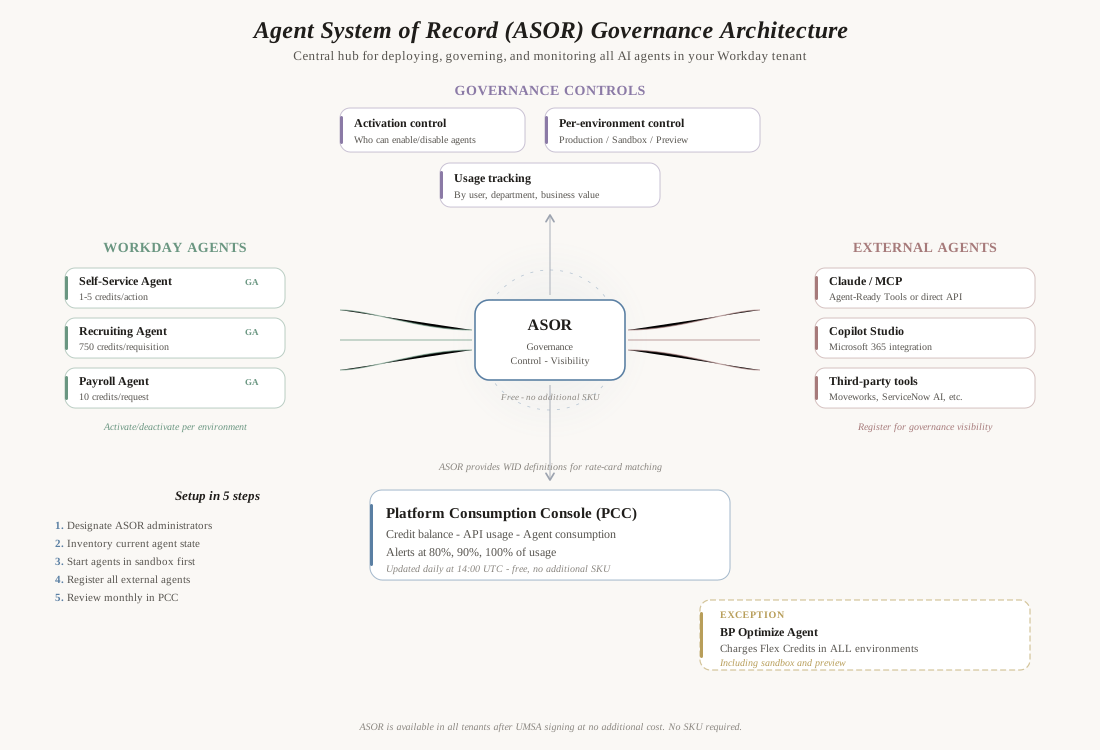
ASOR is a centralized management console for AI agents operating in your Workday tenant. It handles four things:
Agent activation and deactivation. ASOR controls which agents are turned on in production, sandbox, and preview environments. Without ASOR, you don't have a single place to see what's running and what's not. With it, you can enable the Self-Service Agent in production while keeping the Payroll Agent in sandbox for testing.
Access permissions. ASOR defines who in your organization can activate or deactivate agents. This is critical governance. You don't want an HR analyst accidentally enabling the Contract Negotiation Agent (500 credits per document) without budget approval.
Usage tracking. ASOR provides detailed data on which agents are being used, by whom, and how often. The PCC shows credit consumption, but ASOR shows the operational picture: which departments are using agents, what tasks they're completing, and whether the investment is delivering business value.
External agent registration. This is the feature most customers don't know about. ASOR isn't just for Workday's built-in agents. You can register external agents - Claude, Copilot, third-party tools - for governance and visibility. Registering external agents in ASOR gives you a single inventory of every AI system with access to your Workday data.
Why it matters for Flex Credits
Without ASOR, you have no kill switch. If an agent is consuming more credits than expected, you need a fast way to deactivate it. ASOR provides that.
Without ASOR, you can't attribute costs. The PCC shows aggregate credit consumption, but ASOR connects agent usage to specific users, departments, and business outcomes. When your CFO asks "what are we getting for these Flex Credits?", ASOR is where the answer lives.
Without ASOR, external agents are invisible. If a team deploys a Claude-based MCP integration or a Copilot workflow that calls Workday APIs, those calls consume your entitlement. Without ASOR registration, you don't even know they exist until they show up as unexplained traffic in your PCC.
The BP Optimize exception
Every Workday agent and innovation is free in non-production environments. You can test, evaluate, and pilot without consuming credits. There is exactly one exception: the BP Optimize Agent consumes Flex Credits in all environments, including sandbox and preview.
This is documented but easy to miss. If you enable BP Optimize in sandbox for testing, it starts consuming credits immediately. ASOR is how you control this - deactivate it in non-production environments if you want to avoid the cost, or accept it as a testing expense and budget explicitly.
How to set it up
ASOR is available in all tenants after UMSA signing. There is no charge and no additional SKU required.
Step 1: Designate ASOR administrators. Decide who in your organization has the authority to activate and deactivate agents. This should include your Workday administrator, your IT security lead, and whoever manages your Flex Credit budget. Keep the list small - broad access to agent activation defeats the purpose of governance.
Step 2: Inventory your current state. Before activating anything, review what's already available. After UMSA signing, several agents may be immediately accessible depending on your licensed SKUs. Know what you could turn on before you decide what you should turn on.
Step 3: Start in sandbox. Enable agents in sandbox first. Test them. Measure their credit consumption. Verify that the business outcome justifies the cost. Only then promote to production.
Step 4: Register external agents. If any team has deployed external AI tools that connect to your Workday tenant - middleware with AI capabilities, Claude or Copilot integrations, vendor tools that use your Workday APIs - register them in ASOR. This creates a complete inventory of AI access to your tenant.
Step 5: Set up monitoring cadence. Review ASOR monthly. Check which agents are active, who's using them, and whether any new external integrations have appeared. Compare against your PCC credit consumption to ensure alignment.
What to register in ASOR
Workday-built agents: Self-Service Agent, Recruiting Agent, Payroll Agent, Financial Audit Agent, BP Optimize Agent, Deployment Agent, and all others from the rate card. These register automatically when you activate them.
Custom Extend agents: Any agent your team or partner builds using Workday Extend Professional. These operate within Workday's framework but are custom code.
External AI agents: Claude, Copilot Studio, Gemini, or any AI platform connecting to Workday via REST/SOAP APIs or Agent-Ready MCP Tools. These don't register automatically. You have to add them manually.
Partner tools: Vendor products like Moveworks, ServiceNow AI, Workativ, or StackOne that interact with your Workday data. Even if they don't use Workday's agent framework, they should be registered for governance visibility.
The governance gap without ASOR
Without ASOR, you're managing AI agents the same way organizations managed shadow IT a decade ago: by not managing it at all. Teams deploy tools, connect them to Workday, and nobody knows until the API consumption shows up in PCC or a security audit finds an unauthorized integration.
ASOR doesn't prevent this entirely, but it creates the framework for visibility and control. When someone asks "what AI agents have access to our Workday data?", ASOR is the answer. When Workday ships a new agent next quarter, ASOR is where you decide whether to turn it on.
The cost of setting it up is an afternoon. The cost of not setting it up is invisible AI consumption, ungoverned data access, and no kill switch when something goes wrong.
Frequently asked questions
Does ASOR cost anything? No. ASOR is included at no additional cost. There is no charge and no additional SKU required.
Can I use ASOR without the UMSA? ASOR requires a Workday tenant and is designed to work with the Flex Credit model. It becomes available after UMSA signing.
Does ASOR control API access for non-agent integrations? ASOR is specifically for agent governance. Traditional integrations (SOAP, REST, EIBs, Studio) are managed through Integration System Users, security domains, and business process security. ASOR adds a layer specifically for AI agents.
What happens if I register an external agent in ASOR but it uses normal APIs, not Agent-Ready Tools? Registration provides visibility and governance tracking. It doesn't change the billing path. External agents using normal REST/SOAP APIs still consume API entitlement. External agents using Agent-Ready MCP Tools consume the separate tool-call meter. Registration tells you what exists - it doesn't change how it's billed.
Set up your agent governance with a Consumption Baseline Assessment, or estimate your exposure with our free Flex Credits Calculator.
Related Articles
Sana and Workday's Employee Agents
Workday's AI Agents: What's Live and What's Coming
Ready to Improve Your Workday?
See how Assistly® can streamline your Workday environment with 68% ticket deflection and proactive support that prevents issues before they occur.